Halloween party invitation: editable Canva template
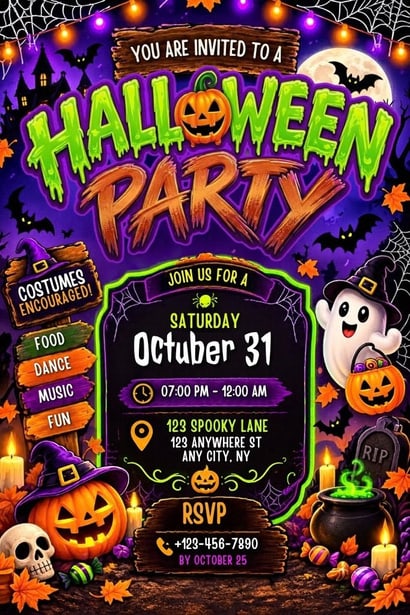
A ready-made spooky invitation — purple background, neon green frame, ghost, pumpkins and bats — that you personalise in free Canva and print or send digitally the same day.

Halloween · Digital template
- Print size
- 5 × 7 in (+ 1080 × 1920 px digital)
- Files
- PDF, JPG and PNG exports
- Edit time
- About 5 minutes
- Needs
- A free Canva account
- Skill
- Beginner
In this post
- Edit Your Invitation Now in Canva
- What You Get With This Halloween Party Invitation Template
- Who Is This Halloween Party Invitation Perfect For?
- How to Access Your Template
- How to Edit Your Halloween Party Invitation in Canva
- Halloween Party Invitation Wording Ideas
- How to Save, Share, and Send Your Invitation
- Professional Printing Guide
- How to Pack and Present Like a Pro
- Frequently Asked Questions
- Get Your Halloween Party Invitation
- License and Terms
Planning a Halloween party starts with one thing your guests will see first — the invitation. A great Halloween party invitation sets the mood before anyone even walks through the door. It tells your guests this is not just another get-together. It is a night of costumes, creepy details, glowing pumpkins, and a little bit of magic.
This editable Halloween party invitation template gives you a ready-made, professional design you can personalize in minutes. No design skills, no expensive software, and no waiting on a designer. You get a 5x7 inch print invitation plus digital versions for WhatsApp, text, email, and Instagram — all fully editable in free Canva.
Edit Your Invitation Now in Canva
Your Canva template access link:
https://canva.link/c4z8fm8df15pwvk
Click the link, sign in with a free Canva account, and choose Use template to make your own copy. From there you can change the date, time, address, RSVP details, colors, and fonts as many times as you like.
Quick facts:
- Instant download after purchase
- Fully editable in free Canva — no Pro subscription needed
- 5x7 inch print size + Instagram Story and mobile version (1080x1920)
- High-resolution exports: print-ready PDF, JPG, and PNG
- Unlimited edits — update text, colors, and graphics anytime
- Works on phone, tablet, and computer
What You Get With This Halloween Party Invitation Template
When you open the template, everything is already laid out for you. The headline, party details, and decorative elements — ghost, pumpkins, bats, and that signature neon frame — are placed so your invitation looks polished the moment you type in your information.
Here is what is included:
- 1 fully editable Halloween invitation design — 5x7 inch, portrait layout
- Matching Instagram Story and mobile version — 1080x1920, perfect for digital sharing
- Print-ready files — export as PDF Print, JPG, or PNG at high resolution
- Unlimited edits — change the wording, move elements, swap colors, or add your own photo
- Free Canva compatible — every element used in the design works with a free account
Because the template lives in your Canva account, you can come back to it next year, duplicate it for a kids' party or an adult costume night, and adjust the style each time without starting from scratch.
Who Is This Halloween Party Invitation Perfect For?
One design, many kinds of Halloween events. This template works for:
- Halloween parties at home — house parties, haunted-house nights, and backyard gatherings
- Kids' Halloween bash — school-friendly, not-too-scary celebrations
- Costume parties — add a line like "Costumes encouraged!" right on the invite
- Spooky dinners — sit-down Halloween dinners and themed potlucks
- Trick-or-treat parties — pre-trick-or-treat meetups for families
- Neighborhood Halloween events — block parties and community nights
- School Halloween parties — classroom and PTA events
- Adult Halloween nights — cocktails, costumes, and a more grown-up spooky vibe
You can use the same design four ways: as a printed card in an envelope, as a digital evite by WhatsApp, text, or email, as an Instagram post or Story, or as a Facebook event cover. That flexibility is why digital templates have become the go-to choice for party hosts.
How to Access Your Template
Getting your invitation takes less than two minutes:
- Go to Etsy — Your Account, then Purchases and Reviews.
- Find your order — look for "Halloween Party Invitation Template" and click Download Files.
- Open the PDF guide — you will see a button that says "Click here to access your Canva template."
- Click the link — Canva opens in your browser. Click Use template to create your copy.
- Find it anytime — your invitation now lives in your Canva dashboard under Your projects.
Direct Canva link: https://canva.link/c4z8fm8df15pwvk
Copy and paste the link into your browser, or open it directly in Canva. You only need a free Canva account — no Pro subscription is required.
How to Edit Your Halloween Party Invitation in Canva
This template is built for beginners. If you can type, you can finish this invitation in about five minutes.
A) Editing the text (party details)
Click any piece of text — for example "Saturday, October 31" — and type your own date. Double-click to change the time, address, and RSVP number. Use the top toolbar to adjust the font size.
Tip: Keep all important text inside the neon green frame. That frame marks the safe area, so nothing important gets trimmed when you print.
B) Changing the colors
Click the background or any element, then click the color square at the top left and choose a new color. For text, select the text and click the A color icon.
The palette used in this design is a classic Halloween trio:
- Purple — #6A00F4
- Neon green — #39FF14
- Orange — #FF6A00
Stick with these three for a bold, high-contrast look, or swap in your own party colors to match your decorations.
C) Changing the fonts
The headline uses a "Creepster" style spooky font, and the details use Poppins Bold for easy reading. You can keep both, or search "Halloween" in Canva's font library for more spooky options. Keep the detail text in a clean, bold font so the date and address stay easy to read at a glance.
D) Moving and resizing elements
The ghost, pumpkins, and bats are all movable. Click to select, drag to move, and drag the corners to resize. Right-click and choose Delete if you want to remove an element. Use Position, then Backward or Forward, to layer elements exactly how you want them.
E) Adding your own photo or logo
Go to Uploads, upload your photo, and drag it onto the design. This is a lovely touch for a kids' party — add a photo of the birthday child or last year's costume photo to make the invitation personal.
Halloween Party Invitation Wording Ideas
Not sure what to write? Steal one of these ready-to-use wording styles and drop it straight into the template.
Classic spooky
Saturday, October 31 at 7:00 PM
The haunted house on Maple Street
Costumes encouraged — prizes for best dressed
RSVP to [Your Name] at [Phone Number]
Kids' Halloween bash
Games, treats, and a costume parade
Saturday, October 31 at 4:00 PM
[Address]
Please RSVP to [Parent Name] — we can't wait to see your costume!
Adult costume night
Halloween Costume Party — adults only
Friday, October 31 at 8:00 PM
[Address]
Best costume wins a prize. RSVP by October 24.
Spooky dinner
An evening of frightful food and eerie cocktails
Saturday, October 31 at 7:30 PM
[Address]
Limited seats — please RSVP early.
Whatever style you choose, always include the five essentials: who is hosting, what the event is, the date, the start time, the full address, and an RSVP name and number. Add a costume note if costumes are expected — guests always appreciate knowing.
How to Save, Share, and Send Your Invitation
When your design looks right, go to the top right in Canva and choose Share, then Download. Pick the format based on how you plan to send it.
For digital sending (WhatsApp, Instagram, text, email)
Choose JPG or PNG at 100% size, download, and send the file straight to your guests. This is the fastest and most eco-friendly option — no paper, no postage, no waiting.
For printing at home
Choose PDF Print, check Crop marks and bleed, and download. Print on 5x7 inch cardstock for a sturdy, professional feel.
For professional printing
Choose PDF Print with Crop marks and bleed, and select CMYK if you have Canva Pro (otherwise RGB is fine for most print shops). Send the PDF to your printer and ask for trimming to size.
For Instagram Story
Use the second page of the template (1080x1920). Download as PNG and post it to your Story — add a music sticker for extra Halloween atmosphere.
Template sizes at a glance
| Format | Size | Best for |
|---|---|---|
| Print invitation | 5 x 7 inch | Physical cards, envelopes |
| Digital evite | 1080 x 1920 px | WhatsApp, text, email |
| Instagram post | 1080 x 1080 px | Feed post (duplicate and resize) |
Professional Printing Guide
Want your invitations to look like they came from a luxury print shop? Follow these settings.
Paper recommendations
- Best choice: 300–350 GSM matte cardstock or linen cardstock — premium feel, no glare
- Budget luxury: 250 GSM glossy photo paper — colors pop, especially the orange and neon green
- Eco option: Kraft or recycled matte cardstock at 300 GSM
- Avoid: Regular 80 GSM printer paper — too thin, and it makes a good design look cheap
Print settings
- Print size: 5x7 inch with 0.125 inch bleed (already added in the template)
- Color mode: CMYK for a print shop, RGB for a home inkjet printer
- Quality: Highest / Best Quality, 300 DPI
- Cutting: Use a paper trimmer, not scissors, for clean straight edges
Where to print
- At home: Any inkjet printer with thick cardstock works well
- Local print shops: FedEx Office, Staples, Office Depot, or Vistaprint — ask for a "5x7 flyer on 300gsm matte with trimming"
- Online: Prints of Love, Canva Print, VistaPrint, or Amazon Print — just upload your PDF Print file
Finishing touches (pro secrets)
- Add rounded corners with a corner punch — a small detail that makes the card feel expensive
- Try soft-touch lamination or spot UV on the pumpkins and ghost for a luxury finish
- For a kids' party, print small candy icons and tuck them into the envelope as confetti
How to Pack and Present Like a Pro
If you are handing out printed invitations, presentation turns a nice card into a memorable one.
Envelope guide
Use A7 envelopes (5.25 x 7.25 inch) for 5x7 cards. Black, orange, or kraft envelopes all match this design. For a striking detail, choose envelopes with a colored lining — orange inside a black envelope looks amazing. Seal each envelope with a Halloween sticker, or a wax-seal stamp that says "Costumes Encouraged!"
If you sell printed invitations
- Place each invitation in a clear cellophane sleeve (A7 size, 5.5 x 7.5) to protect it from fingerprints.
- Add a small insert card — "Thank you for coming!" plus your name, and a small candy.
- Mail in a rigid mailer, not a regular envelope, and add a "Do Not Bend" sticker.
- For bulk orders, bundle sets of 10 with twine and a dried orange leaf.
The eco-friendly digital option
More hosts are choosing zero-waste invitations. Send the JPG by WhatsApp, or add a little motion first: in Canva, choose Animate, then Pop, download as MP4, and send an animated invitation. It costs nothing to print and lands in your guests' hands instantly.
Frequently Asked Questions
Can I edit on my phone?
Yes. The Canva app for iOS and Android is free. Open the template link in the app, tap Customize, pinch to zoom, and tap any text to edit it.
Do I need Canva Pro?
No. This template uses only free Canva elements, so a free account is all you need. Pro elements are marked with a crown in Canva — this design avoids them.
Can I resell the template as my own?
No. You may sell printed invitations made from the template, but you cannot resell or share the Canva link itself. The template is licensed for your own events and your own party clients.
My text is getting cut off when printing. What should I do?
Keep important text inside the safe margin — at least 0.25 inch from the edge. Text placed right at the edge can be trimmed because of bleed. Staying inside the neon frame in the design prevents this.
Can you edit it for me?
Yes — message the shop on Etsy. Minor text edits are free within the first 24 hours after purchase.
What if the link does not work?
Make sure you are logged into Canva, then try the link again: https://canva.link/c4z8fm8df15pwvk. If it still fails, message the shop and a fresh link will be sent right away.
Get Your Halloween Party Invitation
Ready to send an invitation your guests will actually get excited about? Open the template, add your party details, and you are done — print it, text it, or post it the same day.
Edit your Halloween party invitation here:
https://canva.link/c4z8fm8df15pwvk
Unlimited edits, free Canva account, print and digital sizes included. Happy spooky party planning!
License and Terms
Personal and small-business commercial use is allowed for your own parties and clients. You may print unlimited copies for your own events. You may not share, distribute, resell, or give away the editable Canva template file or link. Design copyright remains with the seller. All Halloween graphics are licensed via the Canva Free license.
The box below contains an Etsy link. If you buy through it, we may earn a small commission at no extra cost to you. Learn more.
Want more templates?
Browse editable Halloween invitation templates from independent designers on Etsy.
Browse on Etsy (opens Etsy in a new tab)